
trackr iO Web 1.14.0: Meet Recurring Billing: Bill the Month, Not Every Visit
Release notes for trackr iO Web 1.14.0
Release summary
Recurring billing is here, and it changes how route customers get billed. Instead of an invoice for every visit, you set a customer up once with a billing cycle and a price, and trackr iO collects everything from their completed route visits into one draft invoice per period. You review the draft, adjust what you need, and close it into a single combined invoice, or let Trackrio generate and email it automatically on the billing date.
This release brings the billing settings, automatic draft generation, a new page for reviewing and editing drafts, and automatic sending on the billing date.

Recurring billing
What recurring billing is
Recurring billing lets you bill a customer on a regular cycle, for example monthly, instead of invoicing every visit separately. On the billing date, the customer receives one combined invoice carrying their subscription charge and any product charges for the period.
Recurring billing works with route visits. Customers serviced through routes can be moved onto it from your organisation's defaults: billing cadence, billing timing, bill on day, chemical billing mode, rate type, and automatic sending. These defaults prefill the form whenever you enable recurring billing for a customer, so most customers are set up in a few clicks. Changing the defaults never switches billing on or off for anyone by itself.
Turn it on per customer
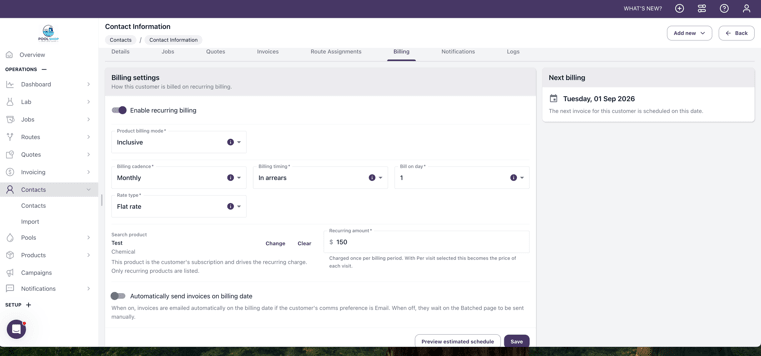
On the customer's Billing tab, switch on Enable recurring billing. The form prefills from your defaults, and you adjust it for this customer:
Billing cadence: how often the customer is billed, for example monthly.
Billing timing: in arrears bills for the finished period; in advance bills for the upcoming one based on the customer's route pattern.
Bill on day: the day of the cycle the invoice is generated.
Chemical billing mode: Inclusive means products flagged as free are covered by the recurring price. Exclusive means only paid products are billed, and a free item shows as a line with a 100 per cent discount.
Rate type: Flat rate charges one fixed amount per period, no matter how many visits were completed. Per visit creates one clearly titled line for each visit in the period.
Recurring product and amount: pick the product that represents the service subscription. Only products marked as recurring eligible can be selected. The amount set here overrides the product's list price.
Automatically send invoices on billing date: when on, the generated invoice is emailed to the customer automatically.
The Next billing panel on the same tab always shows the date the next invoice will be generated for the settings currently in the form.
Drafts build themselves
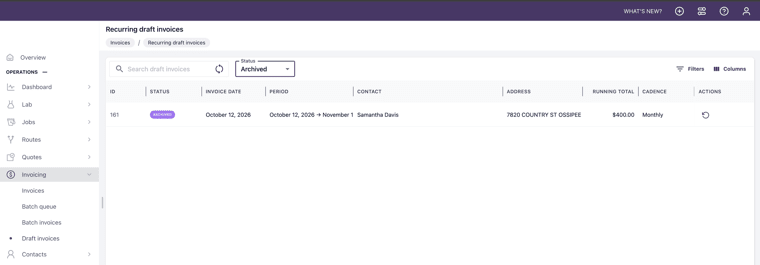
As route visits are completed, their charges collect automatically on a draft invoice for that customer and billing period. You will find the drafts under Invoicing: each one shows its status as a chip, Draft or Archived, and the list opens filtered to Draft so current work is always in front of you. From the list, you can open a draft to edit it, close and send it, or archive it.
One safeguard runs underneath everything: if a job already has an invoice of any kind, Trackrio never automatically invoices that job again. No customer can be billed twice for the same visit.
The draft invoice page: review and shape the invoice before it goes out
Opening a draft brings you to a new page built for one job: getting the period's invoice exactly right before the customer sees it.
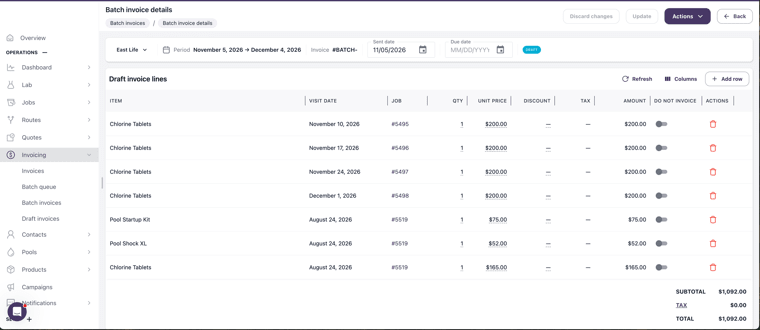
At the top, you see who the invoice is for, the billing period it covers, the invoice number, the sent date, the due date, and the status chip. Below sit the draft invoice lines, one row per charge, with the visit date and the job each line came from, its quantity, unit price, discount, tax, and line amount. Subtotal, tax and total recalculate live at the bottom as the lines change.
While the draft is open, the invoice is yours to shape:
Edit inline. Quantity, unit price, and discount are edited straight in the row, no separate dialogues.
Keep a line off the invoice without deleting it. Every line has a Do not invoice toggle. Switch it on, and the line stays visible for your records but drops out of the total and never reaches the customer.
Add anything extra. Add row lets you put a one-off charge on the invoice for anything that happened outside the routed visits, and lines you added yourself can be removed again.
See it your way. Choose which columns are visible, and use Refresh to bring the lines up to date with the latest completed visits.

A Message to customer section carries your note onto the invoice the customer receives. Update saves your changes, Discard changes drops them, and the Actions menu is where the draft moves on to the next step.
Close and send, with a clear confirmation
Closing a draft always passes through a confirmation that shows exactly what is about to happen: the customer, the email address the invoice goes to, the amount, and the billing period. Nothing goes out on a misclick.
Archive instead of delete, restore when needed
A draft you do not want to invoice is archived, not deleted. The confirmation tells you the period will not be invoiced, and the draft moves to the Archived list. If circumstances change, an archived draft can be restored to Draft, and the confirmation states exactly which period you are restoring.
Invoices go out on the billing date by themselves
With automatic sending on, the invoice generated on the billing date is emailed to the customer without anyone touching it, as long as the customer's invoice preference is Email. The list of generated invoices shows a Sent or Not sent indicator for every one, so you always know what reached the customer.
Jobs of recurring customers know it
When a customer is on recurring billing, their jobs stop offering per-visit invoicing: Preview and send invoice is no longer shown on the job. Their billing happens in one place, on the cycle, and the two flows can never collide.
Impact at a glance
Who it helps: office admins billing route customers every period
Highlights: per-customer billing cycles, drafts that build themselves from completed visits, a new page to review and shape each invoice before it goes out, safe close and send with confirmation, archive with restore, automatic emailing on the billing date
Platform: Web 1.14.0